


Screenshoter 1.6 | 174 KB
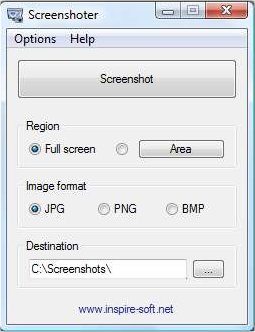
Every unnecessary feature has been kept out without exception. Click on the button or push the “Print Screen” key on your keyboard and the screen will be directly saved as an image – Done!
It’s still possible to customize all settings: Capture just a certain area of the screen, display the current mouse cursor or set the saving image format (Jpg, Png or Bmp). Other features such as setting up the image quality and automatically copying the screenshot to the clipboard are available as well. Moreover Screenshoter can be minimized to the tray so it doesn’t block your work.
Worth mentioning is that full screen applications can be captured as well. With this advantage it’s easily possible to create high quality screenshots of games, websites, office programs and even movies!
Features
*Just pressing the button or pushing “Print Screen” key is needed
*Capture whole screen or a defined area
*Optionally show the cursor on the screenshot
*Save in jpg, png or bmp format
*Minimize to the notification area
*Multilingual: DE, EN, ES, FR, IT, PT
*Portable: Just one executable, no need for installation
Download
OR
